Daily Weather: Forecast&Alerts
- 4.1
- Rating
- 1.00M
- Installs
- Free
- Price
 Analysis by App-foxy
I usually judge a weather app by what happens in the few seconds when I need an answer: before leaving home, while planning a walk, or when the sky suddenly changes. Daily Weather: Forecast&Alerts takes that practical route rather than trying to be a complete lifestyle platform. It is a free weather app from RODRIGUEZCASTILLO FABIOLA, aimed at giving everyday users a quick way to stay aware of changing conditions.
My first impression is that its appeal comes from simplicity. The store summary promises a way to stay ahead of the weather, and the app’s role is easy to understand: open it when you want weather information without paying for access. It is rated for Everyone, which makes it a reasonable option for a shared family phone or for someone who wants a straightforward forecast tool rather than a technical meteorology dashboard.
The app has reached more than a million installs and holds a 4.4 average from roughly two thousand ratings, with 153 written reviews. Those figures suggest that it has found a sizeable audience, although popularity alone is not proof that every forecast will suit every location. Weather apps depend heavily on local coverage, update timing, and the quality of the underlying information, so I would still treat Daily Weather as a useful planning aid rather than an authority for serious weather decisions.
You May Also Like

 Blood Strike: 2.5 Anniversary
Blood Strike’s Loadouts Turn Every Drop Into a Tactical Gamble
A close look at Blood Strike’s custom loadouts: how fast access to signature weapons reshapes its battle royale rhythm, rewards preparation, and narrows the gap between fights.

 Pandora - Music & Podcasts
Pandora’s Music Is Easy to Start, but Harder to Recover
Pandora’s strength is its low-effort path from a seed to a station. Its weak spot is how much confidence it asks you to place in connection, setup, and quiet recovery.

 8 Ball Pool
 Is Built on Rivalries, Rematches, and Routine
A close look at the rivalries, rematches, shared routines, and unanswered safety questions that turn a quick pool match into a persistent mobile community.

 Samsung Music
’s Quiet Strength Is Playing What You Already Own
Its reach comes less from spectacle than from dependable access to a personal library. That simplicity is both the app’s strongest retention engine and its ceiling.

 AccuWeather: Weather Radar
AccuWeather Review: A Quick, Clear Forecast for Everyday Decisions
For everyday plans, the best forecast is the one you can understand quickly. AccuWeather makes rain timing, radar, and local conditions easy to act on, with a few trade-offs.

 Hill Climb Racing
Why Hill Climb Racing Still Turns Crashes Into One More Run
A tiny car, a bumpy hill and one more upgrade: Hill Climb Racing keeps resurfacing because its simple chaos makes every near-miss feel personal.
More From Our News Desk



What Daily Weather is like in everyday use
I find a weather app most useful when it helps me make a decision quickly, not when it encourages me to keep refreshing it. In everyday use, I would focus on whether Daily Weather gives me a clear enough view to plan clothes, errands, or time outdoors, then check again before plans that depend on the conditions. That practical test also sets up the next question: how it holds up when I rely on it more often.
A quick check before ordinary plans
The most convincing use case is the small daily decision. I can imagine opening the app while getting ready for work, checking whether an outdoor commute looks comfortable, and then deciding between light clothing, a jacket, or a different route. The same habit works before taking children to school, walking a dog, shopping, or setting aside time for gardening.
That kind of use rewards an app that does not make the user work too hard for the answer. Daily Weather: Forecast&Alerts is positioned as a focused weather product, so I would approach it with one question in mind: can I quickly understand what the day may bring? If the screen presents the important information clearly, that is more valuable to me than a crowded collection of charts I rarely use.
A practical routine is to check the app twice instead of relying on a single morning glance. I would look once when planning the day and again before leaving for a longer trip or outdoor activity. The second check matters because weather can change, and a forecast is not a promise. This is also a fair way to judge whether the app’s updates feel timely in the places where I actually spend time.
Useful for planning, not a substitute for judgement
I would use this app for choosing when to run errands, deciding whether a picnic is sensible, or checking conditions before a short drive. I would not make it my only source for dangerous storms, flooding, wildfire conditions, aviation, or other situations where official alerts and local authorities matter more than convenience.
That distinction is important for a weather app with a broad audience. A clean forecast can help me organize a normal day, but it should not encourage false confidence. When conditions are severe or changing quickly, I would compare the information with official local warnings. Daily Weather works best as part of that habit, not as a replacement for it.
How it compares with familiar alternatives
The usual alternatives fall into three groups: the weather panel already built into a phone, a large general-purpose weather service, and specialist tools designed for storms, travel, or outdoor sports. A built-in option is convenient because it requires no extra installation, while a major weather service may provide a wider range of maps, radar views, and location tools.
Daily Weather makes more sense for someone who wants a dedicated weather app that is free and easy to approach. It may be less suitable for a user who wants detailed radar interpretation, extensive historical information, advanced alerts, or highly specialized forecasts. I would also choose a more established specialist service when a decision depends on minute-by-minute precipitation or severe-weather tracking.
The trade-off is straightforward: a focused app can feel less distracting, but a simpler experience may not satisfy people who want to investigate every layer of a forecast. Before switching permanently, I would install it alongside my current option for several days and compare the same location at the same times. That test reveals more than a quick first impression because it shows whether the app fits my actual routine.
Trust begins with what the app clearly lets me control
Weather apps naturally raise questions about location and alerts. To provide useful local information, an app may need some way to know which place I want to follow, but I do not want to grant more access than necessary. My preferred approach is to begin with the narrowest location choice available, such as selecting a city manually if the app permits it, and only enable device location when the convenience is worth it.
I would also review the operating system’s permission screen rather than accepting every request automatically. That gives me a clear opportunity to decide whether location access is appropriate and whether it should be limited while using the app. If I do not need automatic local updates, a manually selected location can be a more comfortable compromise.
The same principle applies to notifications. Alerts can be useful when I genuinely need weather changes brought to my attention, but unnecessary notifications quickly become irritating. I would turn them on only after deciding what information deserves an interruption. If the app offers separate choices for different alert types, I would keep the useful ones and disable the rest; if the system provides a notification switch, I would use that to keep control.
Data-sensitive moments deserve a pause
The most sensitive moment is the first launch, before I have decided how much access I want to give the app. I would read each permission prompt, check whether it matches the feature I am trying to use, and avoid approving anything that feels unrelated. A weather app should not receive broad access simply because I want to see today’s conditions.
Another moment comes when changing locations. If I am traveling, I would consider whether automatic location tracking is genuinely useful or whether I can select the destination manually. A manually chosen city is often enough for a short visit, and it avoids leaving location access active when I am not using it. This is a small habit, but it gives me a better sense of agency.
I would apply the same caution when deciding whether alerts should be allowed. Notifications are not just a convenience; they determine when the app can reach me. I prefer to enable them for a clear reason, then revisit the choice after a few days. If the alerts do not help me make better decisions, I would switch them off rather than allowing them to become background noise.
What I would check before making it my main weather tool
Because the app is relatively new, released on September 15, 2025, I would spend a little time checking how it behaves on my particular phone and in my usual area. The current version is 1.0.30, and it supports devices running Android 7.0 or later. That makes it accessible to many older Android devices, but compatibility on paper is not the same as a perfect experience on every handset.
I would pay attention to whether the app opens reliably, whether the selected location remains correct, and whether the forecast is easy to read in bright daylight. I would also watch for practical friction such as repeated permission prompts, alerts that arrive too often, or a location that changes when I did not intend it to. These details matter more to me than a polished first screen because they determine whether I keep the app installed.
A useful test is to set one familiar location and use the app at consistent points during the day. I would compare what it shows with the conditions outside and with an official local source during unsettled weather. This is not a scientific accuracy study, but it helps reveal whether the information is dependable enough for ordinary planning in my area.
Simple workflows that make the app more useful
My first workflow would be a morning decision check. I would look at the day before choosing clothes and packing anything needed for commuting. Instead of staring at the forecast repeatedly, I would identify the one or two details that affect my plan, such as whether outdoor time is sensible or whether I should leave earlier.
My second workflow would be a pre-activity check. Before a walk, sports session, or outdoor appointment, I would open the app again rather than relying on memory. I would treat the result as a go-or-adjust signal: continue, shorten the activity, move it indoors, or check a more authoritative warning source if conditions look serious.
My third workflow would be notification housekeeping. I would start with alerts disabled unless I already know I need them. After using the app for a while, I would enable only the notifications that solve a real problem. This prevents the common mistake of allowing every alert during setup and then ignoring all of them because there are too many.
These workflows are not hidden features, and I would not assume that every device presents the same controls. They are simply sensible ways to use the app while keeping attention on user choice. The important point is that a weather tool should support my decisions without quietly taking over them.
Who is likely to enjoy it
I think Daily Weather is best for people who want a free, dedicated weather app for normal daily planning. It should appeal to users who prefer a clear purpose, do not need specialist meteorological tools, and want an option that can run on an older Android phone. Families may also appreciate the Everyone rating when choosing an uncomplicated weather utility for general use.
It may be especially useful for someone who has outgrown a basic home-screen widget but does not want a large weather platform filled with maps and extras. The app’s focused identity makes sense for checking conditions before leaving home, keeping an eye on a selected place, and deciding whether an outdoor plan needs adjustment.
Who should choose something else
I would look elsewhere if my main requirement were detailed storm analysis, advanced radar, specialist forecasts, or highly granular outdoor planning. A dedicated service built around those needs is likely to provide more depth. I would also hesitate if I wanted a weather experience tied tightly to a broader ecosystem of calendars, travel planning, smart-home routines, or wearable devices.
Users who are particularly careful about permissions should take time during setup and inspect the choices offered by both the app and Android. That is not a criticism unique to this product; it is simply the right approach for any app that may use location or send alerts. If the available controls do not match my comfort level, I would rather use a manual location method or select another weather tool.
My cautious verdict
Daily Weather: Forecast&Alerts is a sensible free option for straightforward weather checking. I like the idea of using it as a calm, practical part of a daily routine rather than treating it as an all-purpose weather command center. Its 4.4 average and audience of over a million installs show that many people have found value in it, while the written reviews offer additional experiences worth considering before installation.
My recommendation comes with a clear boundary: use it for ordinary planning, verify serious conditions with official sources, and make deliberate choices about location and notifications. The best experience will come from treating permissions as decisions rather than automatic steps. I would install it if I wanted a focused weather app that is free and compatible with an older Android device, then test it against my existing routine for several days.
My bottom line is simple: Daily Weather is worth trying when convenience and a focused forecast matter more than specialist depth. I would keep it if the location handling feels predictable, the alerts remain useful, and the information matches what I need in my area. If I needed advanced weather analysis or stronger control options than the app visibly provides, I would move to a more specialized alternative instead.
FAQs for Daily Weather: Forecast&Alerts
01What features does Daily Weather: Forecast&Alerts offer?
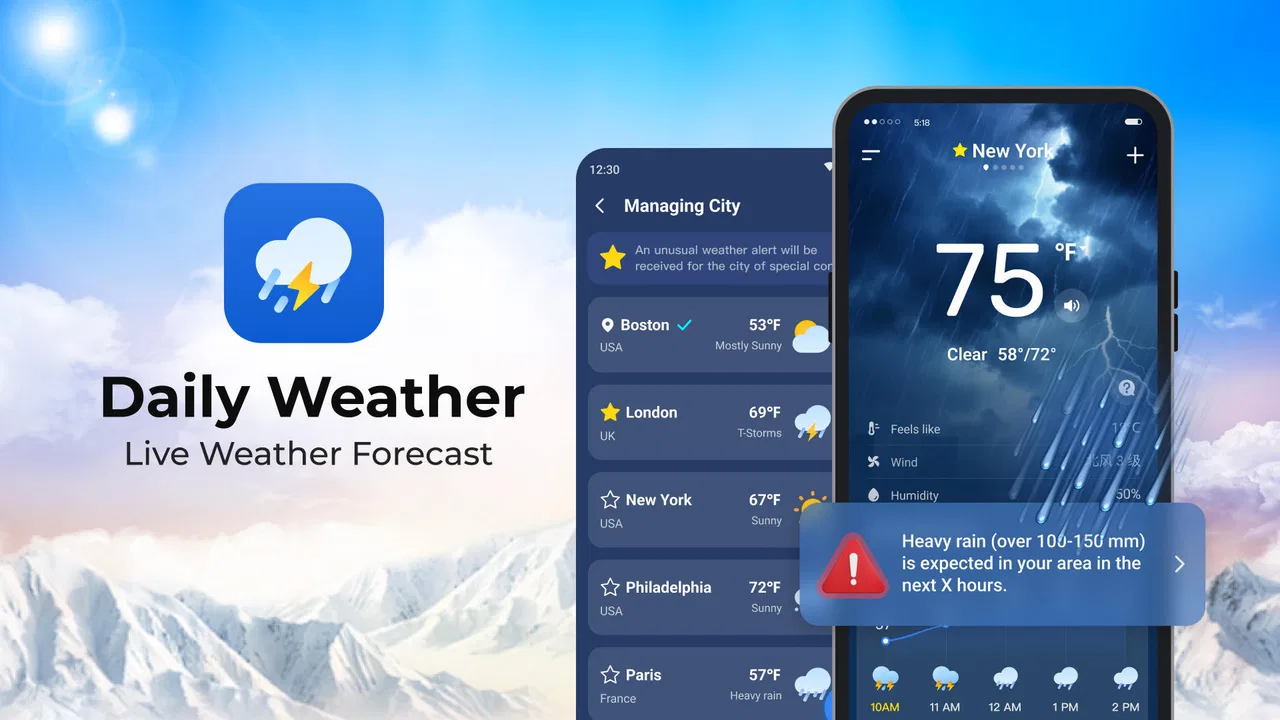
Daily Weather: Forecast&Alerts provides real-time weather updates, detailed forecasts, and severe weather alerts. Users can access hourly, daily, and weekly forecasts, radar maps, and customizable notifications. The app also includes features like sunrise and sunset times, wind speed, humidity levels, and more, making it a comprehensive tool for weather enthusiasts.
02Is Daily Weather: Forecast&Alerts free to use?
Yes, Daily Weather: Forecast&Alerts is free to download and use. However, it may offer in-app purchases or a premium version that provides an ad-free experience and additional features. Always check the app’s description on the app store for the latest pricing and subscription information.
03How accurate are the weather forecasts provided by Daily Weather: Forecast&Alerts?
The app sources its data from reliable weather services and uses advanced algorithms to provide accurate forecasts. While no weather app can guarantee 100% accuracy due to the unpredictable nature of weather, Daily Weather: Forecast&Alerts aims to offer the most up-to-date and precise information available.
04Can I customize the notifications in Daily Weather: Forecast&Alerts?
Yes, users can customize notifications to receive alerts for specific weather conditions, such as severe weather warnings, temperature changes, or rain forecasts. This feature helps users stay informed about significant weather changes that might affect their daily plans.
05Does Daily Weather: Forecast&Alerts track my location?
To provide accurate local weather forecasts, the app may request access to your device’s location services. Users can opt to allow or deny this access, but enabling it is recommended for the best experience. The app follows privacy guidelines to ensure user data is protected.
Pros
- Accurate real-time weather updates.
- User-friendly interface with easy navigation.
- Customizable weather alerts.
- Detailed forecasts for multiple locations.
- Minimal data usage for updates.
Cons
- Contains ads in the free version.
- Limited features without subscription.
- Occasional loading delays.
- No offline mode available.
- Some features are region-specific.

Daily Weather: Forecast&Alerts
Gallery